
BrightBox
A collaborative virtual study room app where users join timed sessions with friends to stay accountable, focused, and productive together.
Hire Me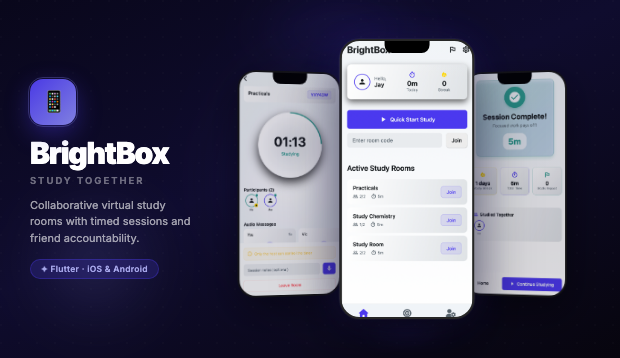
A collaborative virtual study room app where users join timed sessions with friends to stay accountable, focused, and productive together.
Project Overview
BrightBox transforms solo studying into a shared, social experience. Users create or join virtual study rooms — timed sessions where participants work alongside each other in real time, fostering mutual accountability and focus through presence.
The app features quick-start study sessions for instant focus, browseable study rooms organized by subject, a rich in-session experience with participant avatars, mute controls, and a prominent countdown timer, plus detailed session completion summaries with time, focus score, and streak stats.
Whether prepping for exams, grinding through coursework, or tackling a personal project, BrightBox provides the productive energy of a library study group — available anytime, anywhere.
The Approach & Solution
BrightBox was built on the "body doubling" principle — the proven productivity boost that comes from working in the presence of others, even virtually.
Architecture: Flutter front-end with real-time session management. Study rooms support multiple concurrent participants with presence indicators, audio toggle, and synchronized timers. The session lifecycle handles join/leave/completion states gracefully across unreliable mobile connections.
Design System: A bold indigo-purple palette (#4A3AE5 primary) with teal and green accents creates an energetic, academic atmosphere. The home screen uses large, tappable room cards with participant counts and subject tags for quick scanning. Session completion screens celebrate achievements with colorful stat breakdowns.
Real-Time Engine: Study rooms maintain live participant lists with avatar displays and audio state indicators. The shared timer creates a sense of collective momentum — everyone sees the same countdown, fostering synchronized focus sprints.
UX: The "Quick Start Study" button dominates the home screen, reducing the friction between intent and action to a single tap. Room discovery is organized by recent, popular, and subject category, making it easy to find the right study environment.